

In our updated CyberGhost VPN review for 2026, we cover the features that actually matter day to day, including its privately managed NoSpy servers, independently checked no-logs policy, strong encryption, Content Blocker, Smart Rules, and automatic Wi-Fi protection. We also look at how the apps feel in real use, how settings are organised, and which tools are worth turning on.
Whether you are streaming at home, travelling and logging in on public Wi-Fi, or jumping into online matches, CyberGhost VPN aims to keep things simple while still delivering reliable privacy and steady performance. It supports Android, iOS, Windows, macOS, Linux, and router setups, which makes it a practical option for households and anyone who switches between devices in 2026.
CyberGhost VPN Score Summary
FROM £1.78/MO
Disclosure: The links above and on this page are affiliate links. If you buy through them, we may earn a commission at no extra cost to you.
This straight-talking CyberGhost VPN review explains where it shines in 2026, focusing on its dependable speeds, independently audited no-logs stance, strong encryption, and overall value for everyday use.
- 🛡️ No-Logs Policy
- 📱 7 Devices
- 🔒 AES-256 Encryption
- 🔒 Kill Switch
- 🚫 Ad Blocker
- 🎬 Streaming Unlock
- 🛠️ Split Tunneling
- 📍 Dedicated IP
- 🔐 WireGuard Protocol
- 🛡️ NoSpy Servers
- ⚙️ Smart Rules
- 🌐 Browser Extensions
- 📤 P2P Servers
- 📺 Smart DNS
- 🌍 Obfuscated Servers
- 🎥 Streamers
- ✈️ Travelers
- 🎮 Gamers
- 👩💼 Small Business
- 🌐 General Use

CyberGhost VPN Review 2026: What It’s Like to Use in Real Life
We Tested CyberGhost VPN Ourselves: Ech the Tech Fox’s Hands-On Verdict
Our CyberGhost VPN Summary for 2026: What We Liked, What We Didn’t, and Who It Suits
In our testing, CyberGhost stood out for being easy to navigate, quick to set up, and simple to use across everyday tasks. We focused on the things most people care about, such as stable speeds, privacy basics, and whether its streaming and general browsing experience feels consistent on typical home and public networks.
Ech says: "When we put CyberGhost through everyday use, it felt like a VPN built for people who want a clear interface and quick connections, without fiddling with endless settings."
CYBERGHOST VPN FEATURE HIGHLIGHTS
🧪 “Here’s what stood out when we used CyberGhost day to day in 2026, from privacy essentials to the tools that make it easier to live with.”
AUDITED NO-LOGS POLICY
CyberGhost promotes a no-logs approach and has had key parts of its privacy stance independently assessed. In practical terms, this is the feature that matters most if you want routine browsing that feels less tracked and more private.
MULTI-DEVICE COVERAGE
You can protect multiple devices at once under one subscription. That includes phones and laptops, and you can extend coverage to consoles and smart TVs by using a router setup.
NOSPY SERVERS
CyberGhost’s NoSpy servers are designed for tighter control and an extra layer of trust, with the infrastructure located in Romania. If you want a more privacy-focused server option, this is one of CyberGhost’s standout extras.
AUTOMATIC KILL SWITCH
The kill switch is there to help prevent accidental leaks if the VPN drops. It is the sort of feature you hope you never notice, but it matters most on unstable networks like hotel Wi-Fi.
CONTENT BLOCKER
CyberGhost includes a blocker aimed at cutting down trackers and known malicious domains. It is a useful bonus layer, especially when you are clicking around on unfamiliar sites or using public networks.
STREAMING-OPTIMISED SERVERS
CyberGhost offers labelled servers designed for popular streaming services. The big benefit is speed and convenience, as you are not guessing which location is most likely to work for your platform.
SMART RULES AUTOMATION
Smart Rules lets you automate behaviour, such as connecting when an app launches or when you join certain networks. Once set up, it reduces the “did I turn my VPN on?” moment to basically zero.
WIREGUARD SUPPORT
WireGuard is available for a fast, modern option that often feels snappier than older protocols. It is a good pick for everyday browsing, streaming, and anyone who wants a lighter performance hit.
AUTO WI-FI PROTECTION
Auto Wi-Fi protection can start the VPN for you when you join unfamiliar networks. It is ideal for travel, cafés, airports, and anywhere you would rather not trust the hotspot.
CyberGhost VPN Pros and Cons: Our Honest 2026 Take
The best bits we noticed in testing, plus the annoyances you should know about
✔ Streaming Servers Made Setup Genuinely Easy
In our hands-on use, the labelled streaming servers saved time. Instead of hopping between locations, we could pick a streaming category and get going quickly, which is exactly what most people want when they just want to press play.
✔ Huge Location Choice for Finding a Stable Route
The size of the network is useful in real life because it gives you options when one route feels busy. During testing, switching to a nearby alternative location often helped us find a steadier connection without changing anything else.
✔ Strong Safety Basics That Are Actually Easy to Use
The kill switch, leak protection, and auto Wi-Fi behaviour are the sort of features you want enabled once and then forgotten. We found the apps beginner-friendly, with settings that are easy to locate rather than buried.
✖ The Apps Can Feel Busy if You Prefer Minimal Controls
CyberGhost offers lots of toggles and categories, which is great if you like options. In our testing, it also meant the interface could feel a bit crowded compared with simpler VPN apps, especially for first-time users.
✖ Not Every Server Feels the Same, So You May Need to Switch
With a network this large, performance can vary by location and time of day. We occasionally had a server that felt slower, and the fix was simply swapping to another nearby option, but it is still a small extra step.
✖ The Best Monthly Value Usually Requires a Longer Plan
Like most premium VPNs, the cheapest effective monthly price typically comes from a longer subscription. If you only need a VPN for a short trip or a quick project, the month-to-month cost can feel less attractive.
About CyberGhost VPN: What It Is, Who It’s For, and Why It Matters
A closer look at CyberGhost’s approach to privacy, usability, and trust
What CyberGhost VPN Actually Does
In everyday use, CyberGhost functions as an all-purpose privacy tool rather than a niche or power-user VPN. It focuses on encrypting your connection, reducing tracking, and making tasks like streaming, browsing on public Wi-Fi, or switching locations feel straightforward instead of technical. From our testing, it is clearly designed for regular users rather than people who want to tweak every setting manually.
CyberGhost’s Focus and Priorities
CyberGhost places most of its emphasis on simplicity and predictability. The apps guide you toward common use cases such as streaming, secure Wi-Fi, or automatic protection, rather than assuming you already know how VPNs work. Its privacy claims are supported by an audited no-logs position and features that aim to reduce user error, which is where many people slip up.
Where CyberGhost Feels Different
What stood out to us is how opinionated CyberGhost feels compared with many competitors. Instead of presenting a blank list of servers, it nudges you towards labelled options, automation through Smart Rules, and privacy-first defaults. In 2026, that makes it a good fit for people who want a VPN that quietly does its job in the background rather than demanding constant attention.
Who Should Use CyberGhost VPN?
Five practical groups where CyberGhost makes the most sense, with real-world examples
Streaming-First Households
If your home has multiple people watching on different screens, CyberGhost’s streaming-labelled servers and multi-device support are built for that routine.
Example: One person is on a laptop, someone else is on a tablet, and the TV is running a streaming app. CyberGhost’s organised server lists make it easier to pick a suitable location without guessing, and a router setup can cover devices that do not support VPN apps directly.
Travellers and Frequent Hotel Wi-Fi Users
CyberGhost is a strong fit if you spend time on airports, cafés, trains, and hotels and want your connection encrypted without constant tinkering.
Example: You check in at a hotel and log into banking, email, and work tools on the same network. Auto Wi-Fi protection can help ensure the VPN kicks in when you join unfamiliar hotspots, so you are not relying on memory.
Beginners Who Want a “Set It Once” VPN
If you do not want to learn VPN jargon, CyberGhost’s layout and Smart Rules are designed to keep the experience simple once you have it configured.
Example: You want the VPN to connect automatically when you open a browser or a specific app. Setting a Smart Rule means you are protected in the background without remembering to toggle anything.
Privacy-Minded Users Who Want Extra-Controlled Options
CyberGhost’s NoSpy servers and privacy tooling appeal to people who want a more privacy-forward setup alongside everyday usability.
Example: You do sensitive browsing or research and prefer using privacy-enhanced server options instead of random locations. Choosing a NoSpy server gives you a more deliberate setup when you want an extra layer of confidence.
Multi-Device Users and Mixed Setups
If you bounce between phone, laptop, and home network devices, CyberGhost’s broad platform support makes it easier to keep everything covered.
Example: You use a Windows laptop during the day, an iPhone on the move, and a smart TV at night. CyberGhost supports the common platforms, and using a router setup can extend coverage to consoles and streaming sticks without installing extra apps.
Who Should Not Buy CyberGhost VPN?
Five practical groups where CyberGhost may not be the best match
Large Households That Need More Than 7 Devices at Once
CyberGhost allows up to 7 simultaneous device connections. If your home regularly exceeds that, you may end up disconnecting devices or constantly swapping logins.
Anyone Shopping Only for a Free VPN
CyberGhost is a paid product. There are trials on some platforms and a refund window on eligible plans, but there is no permanent free tier.
Power Users Who Want Maximum Manual Control
CyberGhost is built to be friendly and guided. If you want highly granular routing rules, advanced automation beyond Smart Rules, or constant tinkering with custom configurations, you may find it too opinionated.
Users in Highly Restricted Networks Who Need Stealth Reliability
If you regularly use the internet behind aggressive VPN blocking, restrictive firewalls, or high-censorship environments, CyberGhost may not be the most consistent choice depending on where you are and how filtering is enforced.
People Who Need a Stable IP for Logins Every Day
Shared VPN IPs can trigger CAPTCHAs or extra verification steps on banking, email, and shopping sites. CyberGhost offers a Dedicated IP add-on, but if you are not planning to use it, a standard setup may feel annoying for daily logins.
Why Buy CyberGhost in 2026?
Easy to use • Privacy-first tools • Practical extras that save time
Privacy Options You Can Actually Use
CyberGhost combines core protections such as encryption, leak prevention, and a kill switch with optional privacy-focused features like NoSpy servers. The overall setup is designed to keep privacy strong without adding unnecessary complexity.
Plenty of Locations for Stable Connections
A wide server network gives you flexibility rather than just big numbers. CyberGhost’s coverage helps you find nearby locations and alternative routes when performance varies, which supports more consistent everyday use.
Designed to Reduce Guesswork
Convenience features such as streaming-optimised servers and Smart Rules automation are built into every plan. These tools aim to simplify daily use by reducing manual server selection and repetitive setup tasks.
How Fast Is CyberGhost?
Real CyberGhost Speed & Performance Results
Ech says: “Speed and privacy can coexist. CyberGhost’s verified results show lightning-fast performance across servers worldwide, ideal for streaming, gaming, and secure private browsing.” View the results below:
| Connection Type | Ping | Download | Upload |
|---|---|---|---|
| Without VPN | 4 ms | 220.12 Mbps | 270.34 Mbps |
| Local VPN Server | 30 ms | 200.45 Mbps | 230.18 Mbps |
| US VPN Server | 90 ms | 190.67 Mbps | 210.29 Mbps |
| Asian VPN Server | 210 ms | 180.23 Mbps | 160.45 Mbps |
⚠️ Speeds may vary depending on your connection, server location, protocol, and real-time traffic.
Why Does CyberGhost Feel Fast in Everyday Use?
Large Network for Better Server Choice
CyberGhost’s large server footprint is useful because it gives you more nearby locations and more alternatives when a route feels busy. In practice, that can help reduce congestion issues and keep performance steadier across different times of day.
Modern Protocol Options (Including WireGuard)
CyberGhost supports multiple protocols, including WireGuard. Having a modern option like this can improve responsiveness and reduce the performance hit compared with older setups, especially for streaming, gaming, and general browsing.
No Data Caps for Heavy Use
CyberGhost does not impose bandwidth limits on paid plans, so you are not dealing with data caps that interrupt long sessions. That matters most for large downloads, frequent streaming, and multi-device households.

CYBERGHOST VPN STREAMING COMPATIBILITY 2026
📺 “CyberGhost makes streaming simpler by labelling servers for popular platforms, so you spend less time guessing and more time watching.”
NETFLIX
CyberGhost includes streaming-optimised locations aimed at Netflix in various regions. Availability can change, but the labelled server approach makes it quicker to try the most relevant option instead of hopping between random locations.
BBC IPLAYER
UK server options are available for people who want to use iPlayer while travelling. If a particular server is busy, switching to another UK location is usually the first step to improving playback consistency.
DISNEY+
CyberGhost’s app includes streaming-focused entries for Disney+. As with any platform, what works can vary over time, but having a dedicated category reduces setup time and trial-and-error.
HULU
CyberGhost offers US locations commonly used for Hulu access. For smoother results, it helps to use WireGuard and stick with the nearest suitable US server rather than choosing a distant location.
PRIME VIDEO
Prime Video can be more sensitive to location changes, but CyberGhost’s broad server selection gives you more regional options. If playback fails, trying an alternative server in the same country is often the quickest fix.
MAX
CyberGhost includes locations that people commonly use for Max. Performance depends on distance and server load, so nearby choices usually deliver the most reliable streaming experience.
YOUTUBE
YouTube is usually the easiest win for a VPN, especially for region-limited videos. CyberGhost’s unlimited bandwidth helps for long sessions, and it can also be useful on restricted networks that block video platforms.
PEACOCK
Peacock is typically accessed via US server locations. If you run into buffering, switching to a different nearby US server and using a modern protocol can help reduce slowdowns.
APPLE TV+
CyberGhost supports common regions used for Apple TV+. For the best experience, choose a server close to your physical location or close to the region you are trying to access, depending on what you need.
Will CyberGhost Work With Your Setup?
Apps for the main platforms, plus router options for everything else
Android
CyberGhost has a dedicated Android app built for phones and tablets. You get the essentials such as WireGuard support, a kill switch, and quick connections that suit everyday browsing and streaming.
iPhone and iPad (iOS)
The iOS app is designed for simple, secure use on the move, with strong encryption and an interface that makes it easy to connect, switch locations, and stay protected on public Wi-Fi.
Windows PCs
CyberGhost runs on Windows with practical controls, including a kill switch and optional split tunnelling. It is a solid pick if you want a straightforward VPN for everyday privacy, downloads, and streaming.
Mac (macOS)
CyberGhost supports macOS with modern protocol options like WireGuard, plus the same core safety features you would expect. It is suitable for students, remote workers, and home users who want reliable protection without fuss.
PlayStation (PS4 and PS5)
Consoles rarely support VPN apps directly, so CyberGhost is typically used via a router setup or connection sharing from a PC. This method can also cover streaming apps on your console.
Xbox (One, Series X, Series S)
As with PlayStation, CyberGhost is usually connected to Xbox through a VPN-enabled router or shared connection. It is a common approach for privacy on shared networks and for protecting your IP in online lobbies.
Fire TV and Firestick
CyberGhost offers a Fire TV app for people who want a simple streaming setup. Install it, sign in, pick a server, and you are ready to watch with an encrypted connection.
Smart TVs
For Android TV, you can use a dedicated app. For other smart TV platforms, a router setup is usually the most practical option because it protects the entire home network in one go.
Roku
Roku does not typically support VPN apps, so the usual solution is a VPN router or a shared hotspot connection. Once set up, it lets Roku use the VPN without installing anything on the device itself.
🌍 Where Can You Use CyberGhost VPN?
Wide international coverage, plus specialised servers for common tasks
Broad Global Coverage
CyberGhost offers server locations across a large number of countries, which helps whether you want a nearby connection for speed or a specific region for travel, streaming, and general location switching.
Streaming-Optimised Locations
The app includes dedicated streaming entries to reduce trial-and-error. Instead of guessing which server might work best, you can start with the locations CyberGhost labels for the platform you want to use.
NoSpy Servers for Extra Privacy Focus
CyberGhost offers NoSpy servers aimed at users who want a more privacy-oriented option within the network. If you prefer a more deliberate server choice than a standard location list, this is one of its signature extras.
P2P-Friendly Servers
For users who need peer-to-peer support, CyberGhost provides servers intended for P2P traffic. Combine that with a kill switch and leak protection for a safer setup while downloading.
Dedicated IP Option for Consistency
If you want a steadier identity for logins or remote access, CyberGhost offers a dedicated IP add-on in supported regions. It can be useful for reducing repeated verification prompts while keeping the benefits of VPN encryption.
Does CyberGhost Work in Your Country?
What to expect in popular regions, from open networks to heavily restricted ones
Using CyberGhost in the United States
CyberGhost is generally straightforward to use in the US. The main benefits tend to be privacy on public Wi-Fi, reducing tracking, and using a wide choice of US locations for everyday browsing and streaming.
Using CyberGhost in the United Kingdom
In the UK, CyberGhost works as a general-purpose privacy tool, and it also offers UK server locations that people commonly use while travelling to access UK-based services. Performance depends on server load and your distance to the chosen location.
Using CyberGhost for India
CyberGhost can be used to connect through India via virtual locations where available. This is typically used for accessing region-specific services, and it can be useful when you want a familiar login region while travelling.
Using CyberGhost in China
China is a high-restriction environment where VPN access can be inconsistent. No consumer VPN can promise reliable connectivity at all times, and results often depend on the network, the city, and how actively blocks are being enforced. If you need access in China, you should plan for disruption and test multiple options before you travel.
Using CyberGhost in Russia
Restrictions and enforcement can change quickly in Russia, so VPN reliability may vary over time. A VPN can still be useful for privacy and for attempting to reach services that are limited, but consistency is not guaranteed on every network.
Using CyberGhost in the UAE
In the UAE, a VPN is commonly used for privacy on public networks and for accessing services that may be restricted on certain connections. Laws and enforcement vary, so it is important to understand local rules and use the service responsibly.
Is CyberGhost a Good VPN for Gaming in 2026?
Built for smoother sessions, safer lobbies, and easier server switching
RESPONSIVE PERFORMANCE OPTIONS
CyberGhost supports modern protocols such as WireGuard, which can help keep your connection feeling snappy. A VPN will not magically lower ping in every situation, but a nearby server and a fast protocol can reduce added overhead and improve stability on some routes.
REGION SWITCHING WHEN IT’S ALLOWED
If a game or platform permits it, CyberGhost lets you connect through other regions for matchmaking, travelling, or accessing region-specific services. Results vary by title and anti-abuse systems, so it is best used as a convenience tool rather than a guaranteed bypass.
IP PRIVACY FOR LOBBIES AND STREAMING
A VPN masks your home IP address, which can reduce the risk of being targeted in competitive lobbies or while streaming. Add the kill switch for extra protection so your real IP is less likely to leak if the VPN connection drops.
Is CyberGhost VPN a Good Option for Torrenting?
P2P-friendly servers, privacy protections, and a safer setup for legal file sharing
P2P-FRIENDLY SERVER OPTIONS
CyberGhost provides server choices intended for P2P traffic, which can be useful if you want a clearer, purpose-built option rather than guessing which locations are suitable. For best results, pick a nearby P2P server to avoid unnecessary slowdown.
PRIVACY-FIRST APPROACH
CyberGhost promotes a no-logs position and includes privacy features designed to reduce exposure while connected. If you torrent, the goal is simple: keep your real IP address out of public peer lists and keep your connection encrypted on shared networks.
LEAK PROTECTION AND KILL SWITCH
For torrenting, a kill switch and leak protection matter more than flashy extras. If the VPN drops, the kill switch helps stop traffic so your real IP is less likely to leak mid-session, which is one of the most common mistakes people make with P2P.
⚠️ A note from Ech: FindCheapVPNs does not support piracy or illegal downloads. Use a VPN for privacy and security, and only share or download content you have the legal right to access.
How Secure Is CyberGhost VPN in 2026?
Encryption, privacy controls, and safety features designed to reduce leaks
Strong Encryption
CyberGhost encrypts your internet traffic to help protect it from snooping on public Wi-Fi and from routine tracking on shared networks. This is the foundation that keeps your browsing and app traffic harder to intercept.
No-Logs Focus
CyberGhost promotes a no-logs approach intended to reduce the amount of data linked to your activity. If privacy is the priority, this is one of the first claims you should look for, alongside clear policy wording and third-party verification where available.
NoSpy Servers
NoSpy servers are positioned as a more privacy-focused option within CyberGhost’s network. They are aimed at users who want a deliberate server choice beyond standard locations, especially when privacy matters more than finding the fastest nearby option.
Kill Switch Protection
A kill switch is a simple but important safety feature. If the VPN connection drops unexpectedly, it can block traffic to reduce the chance of exposing your real IP address mid-session.
Split Tunnelling Control
Split tunnelling lets you choose what goes through the VPN and what stays on your normal connection. It is useful when you want privacy for certain apps while keeping local services running normally.
Leak Protection Tools
Leak protection is what helps a VPN behave properly in real use. CyberGhost includes safeguards designed to reduce common exposure points, such as DNS leaks, IP leaks, and browser-related leaks, which can otherwise undermine the point of using a VPN.
What Independent Checks Back Up CyberGhost’s Privacy Claims?
Audit summaries and transparency reporting you can verify yourself
Deloitte Audit (First Review, 2022)
CyberGhost states that Deloitte carried out an independent review of its no-logs claims and supporting systems in 2022. If you want the primary source,
CyberGhost hosts a write-up on its Privacy Hub.
View CyberGhost’s Deloitte audit page (2022)
Deloitte Audit (Second Review, 2024)
CyberGhost also published details of a second Deloitte review in 2024, covering its network and management systems and how they are intended to support its privacy position.
View CyberGhost’s Deloitte audit page (2024)
Quarterly Transparency Reports
CyberGhost publishes transparency reports that summarise legal requests such as DMCA complaints and police requests, with explanations of how it handles them.
This is useful for checking how often requests happen and what information the provider says it can (or cannot) provide.
Read CyberGhost’s Transparency Report hub
Independent Coverage (Secondary Source)
If you prefer an external write-up in addition to CyberGhost’s own posts, some outlets covered the Deloitte review and quoted from the assessment language.
Read TechRadar’s coverage of the Deloitte review
Warrant Canary: What to Know
Some VPNs publish a warrant canary, but CyberGhost is better known for transparency reporting rather than a dedicated canary page.
If this matters to you, treat it as a separate tick-box and compare providers on that specific feature.
External note on warrant canary status (review source)
ECH'S FUN CYBERGHOST FACT
CyberGhost is now trusted by millions of users worldwide — and counting in 2026.
GET CYBERGHOST NOWDoes CyberGhost Truly Operate a No-Logs VPN?
How CyberGhost Handles Data, Audits Its Systems, and Limits Legal Exposure
No Activity or Connection Logs
CyberGhost states that it does not record browsing history, DNS queries, source IP addresses, session timestamps, or traffic destinations. In practical use, this means there is no activity trail stored that could be tied back to a specific user account.
Independently Reviewed Infrastructure
CyberGhost has published the results of independent reviews by Deloitte, which examined whether its internal systems are capable of logging user activity. According to CyberGhost, these reviews found no evidence of logging mechanisms designed to track individual users.
Privacy-Friendly Legal Base
CyberGhost operates under Romanian jurisdiction. Romania does not enforce mandatory data retention laws for VPN providers and is outside the 5 Eyes, 9 Eyes, and 14 Eyes intelligence-sharing frameworks. This limits the legal pressure to retain or hand over user data that CyberGhost claims it does not have.
What Data Does CyberGhost Collect or Store?
VPN tunnel vs account and website data, what is collected, why, and what is not logged
CyberGhost separates “what happens inside the VPN tunnel” from “what is needed to run your account, website, and billing”. The key point is that VPN traffic activity is not logged, but some account, website, and app diagnostics data may be processed to deliver the service.
Inside the VPN Tunnel: What Is Not Logged
CyberGhost states it does not monitor, record, log, or store VPN traffic data such as browsing history, traffic destinations, content, DNS queries, or connection logs tied to your IP address, timestamps, or session duration.
Account and Billing: What You Provide
Creating an account can involve details like name, address, email, username, and payment related information, used for account administration and support. Payment is handled via third-party processors.
Website and App Analytics: Non-Personal Usage Data
The privacy policy describes “Non-personal Data” that can include device and app metadata (for example OS version, language, screen resolution, and other general properties) used for statistics and service improvement. This is described under “Anonymous Information (Non-personal Data)”.
CyberGhost Data Collection and Logging Table
| Data Type | How CyberGhost Describes It |
|---|---|
| Browsing history | Not monitored, recorded, logged, or stored inside the VPN tunnel. |
| Traffic destinations and content | Not monitored, recorded, logged, or stored inside the VPN tunnel. |
| DNS queries | Not logged or stored inside the VPN tunnel. |
| Connection logs (VPN session timestamps, duration, server IP tied to you) | CyberGhost states it does not store connection logs tied to your IP address, connection timestamp, or session duration. |
| Real IP address (VPN use) | Not logged or stored as connection logs inside the VPN tunnel, per the policy. |
| IP address (website and fraud prevention) | The policy describes collecting IP address for website usage in an anonymised format and an approximate location (country only) as part of fraud detection measures. |
| Email address | Collected for account administration, support, and communications (such as service emails and optional marketing). |
| Name and address | May be requested during registration according to the privacy policy. |
| Payment and transaction information | Payment is completed via third-party processors. CyberGhost notes it does not have access to your card details submitted to the payment processor, and lists processor privacy policies on its page. |
| Device and app metadata (non-personal) | The policy lists non-personal data that may include device type, OS version, preferred language, screen resolution, and other general properties and metadata, used as aggregated statistics to improve the service. |
| Advertising identifiers and sensors (where applicable) | The policy references items such as Google Advertising ID and certain sensor data as possible non-personal data collected when interacting with the service or website. |
| Customer support messages | If you contact support or submit forms, the information you provide is processed to respond and provide assistance. |
Cookies and Website Tracking
CyberGhost describes the use of cookies and third-party tools for website analytics and improving the site experience.
Data Retention
The policy explains that collected information may be retained as long as needed to provide the service, comply with legal obligations, resolve disputes, and enforce agreements.
Your Rights and Control
CyberGhost lists common data protection rights such as access, rectification, erasure, restriction, objection, portability, and the right to complain to a supervisory authority. Details are in the “Your rights and Control” section.
Who Owns CyberGhost, and Can It Be Trusted?
Ownership structure, legal base, and real transparency signals
Corporate Ownership
CyberGhost operates under Kape Technologies, a cybersecurity-focused parent company that owns multiple privacy and security brands. From a user perspective, this matters because funding, infrastructure investment, and long-term development are handled at group level rather than by a small standalone firm.
Romanian Jurisdiction
CyberGhost is headquartered in Romania. This is significant because Romania has no mandatory data retention laws for VPN services and sits outside major intelligence-sharing alliances, reducing legal pressure to log user activity.
Ongoing Transparency
CyberGhost publishes regular transparency reports that outline how many legal requests, abuse complaints, and other notices it receives. Even without external verification links, the consistency of these reports over time is a meaningful trust signal.
Long-Term Public Reputation
CyberGhost has accumulated 23,458 trustpilot public user reviews over many years, with an average rating of 4/5 as of the 1st of January 2026 (down from 4.3/5 since our last update a couple months ago). While ratings fluctuate, the volume of feedback provides useful insight into recurring themes such as app stability, refund handling, and customer support rather than isolated experiences.
Has CyberGhost Ever Been Breached?
A Clear Look at CyberGhost’s Security Record and Incident History
No Confirmed User Data Breaches
As of January 2026, there are no publicly confirmed incidents where CyberGhost has suffered a breach that exposed user activity, browsing data, IP addresses, or credentials. Across our research and long-term monitoring of the service, no evidence has emerged of leaked VPN logs or compromised customer databases.
How CyberGhost Limits Breach Impact
CyberGhost’s infrastructure is designed to minimise the damage of any hypothetical intrusion. Its audited no-logs architecture means there is no browsing history or connection metadata stored that could be extracted, even if a server were accessed. This approach significantly reduces real-world risk compared with services that retain session or traffic data.
Privately Managed Server Environment
CyberGhost operates parts of its network, including NoSpy servers, under direct internal control rather than relying entirely on third-party hosting. From a security perspective, this reduces exposure to supply-chain breaches and limits the number of external parties with physical or administrative access to servers.
Disclosure and Transparency Record
CyberGhost has a track record of publishing transparency reports and communicating openly about legal requests and abuse notices. While no service can promise absolute immunity from future incidents, this pattern of disclosure provides reasonable confidence that any serious security event would be acknowledged rather than quietly concealed.
Our verdict: CyberGhost has maintained a clean breach history to date. Combined with its no-logs design and internal server controls, it remains a low-risk choice for users concerned about data exposure.
Does CyberGhost VPN’s Content Blocker Actually Work?
Our first-hand experience: what it blocked, what slipped through
WHAT IT BLOCKED FOR US
In everyday use, CyberGhost’s Content Blocker consistently stopped known ad and tracking domains that load in the background. On news sites and smaller blogs, we saw fewer third-party ad requests, faster initial page loads, and fewer obvious tracker calls firing in the background.
It also blocked access to several known malicious and scam-linked domains during testing. When clicking suspicious links (for example from spammy pages or low-quality download sites), the connection simply failed instead of loading the page, which is exactly what you want from a basic safety layer.
WHAT IT DID NOT BLOCK
It did not remove all visible ads. Large first-party ads on platforms like YouTube, social media feeds, and major news outlets still appeared, including sponsored content and in-feed promotions. Video ads were not stripped out, and page layouts were not cosmetically cleaned.
We also found that some analytics scripts and embedded trackers still loaded if they were served from the same domain as the website itself. This is expected for a DNS-style blocker and highlights that it is not as precise as a browser-based ad blocker.
HOW IT WORKS BEST IN PRACTICE
From hands-on use, CyberGhost’s Content Blocker works best as a background safety and privacy feature, not a full ad-blocking replacement. It reduces exposure to common tracking networks and blocks known bad domains, especially on public Wi-Fi or unfamiliar sites.
For the cleanest browsing experience, we recommend using it alongside a dedicated browser ad blocker. The VPN handles network-level filtering, while the browser extension takes care of fine-grained ad removal and cosmetic clean-up.
Does CyberGhost Offer a Dedicated IP?
How CyberGhost’s Dedicated IP Works and Who It Is For
WHAT YOU ACTUALLY GET
CyberGhost offers a Dedicated IP add-on, which gives you a single, fixed IP address that only you use. Unlike shared VPN IPs that rotate between many users, this address stays the same every time you connect. During testing, the IP remained consistent across sessions and devices once assigned.
The Dedicated IP is available in selected locations, including the US, UK, Germany, and France, and is tied to a separate token rather than your main account credentials.
WHO IT MAKES SENSE FOR
From first-hand use, a Dedicated IP is most useful if you regularly access services that dislike shared VPN addresses. This includes online banking, work dashboards, remote servers, or self-hosted tools that rely on IP allowlists.
We also noticed far fewer CAPTCHA challenges and login verification loops compared to shared servers. If you want the privacy of a VPN without constantly triggering security checks, the Dedicated IP add-on is a practical upgrade.
Is CyberGhost Antivirus Any Good?
What it offers, what to expect, and who it is best for
CYBERGHOST ANTIVIRUS: THE REALISTIC TAKE
CyberGhost offers an Antivirus add-on for Windows in some plans and regions. It focuses on the essentials: real-time malware detection, on-demand scans, and protection aimed at common threats such as ransomware-style behaviour.
The important detail is that it is not a full “security suite” for every device. It is primarily designed for Windows PCs, and you should treat it as a convenient extra if you already want the VPN, rather than the only reason to subscribe.
If you need advanced extras like a password manager, parental controls, identity monitoring, or multi-platform antivirus coverage, you may prefer a dedicated security product alongside the VPN.
Does CyberGhost VPN Support Split Tunnelling?
Choose what goes through the VPN and what stays on your normal connection
WHAT SPLIT TUNNELLING MEANS
Split tunnelling lets you decide which traffic uses the VPN tunnel and which traffic uses your regular internet connection. In CyberGhost, this is typically done via an “exceptions” style setting, where you can choose specific websites or services that should not go through the VPN.
The result is simple: sensitive browsing can stay protected through the VPN, while everyday services that work better locally can run outside the tunnel.
WHY YOU MIGHT USE IT
Split tunnelling is handy when a VPN gets in the way of normal usage. For example, you might keep your browser and downloads protected while letting local services use your standard connection, such as printer and smart-home devices.
It can also reduce headaches with sites that trigger extra verification on VPN IPs. In our day-to-day use, adding a couple of picky services to the exceptions list cut down on repeated logins and CAPTCHA loops, while everything else stayed protected.
What is CyberGhost WireGuard?
The faster protocol option inside CyberGhost, and when you should use it
WHAT WIREGUARD IS
WireGuard is a modern VPN protocol designed to be fast, efficient, and secure. In CyberGhost, selecting WireGuard switches your connection to this protocol so your traffic is still encrypted, but usually with less overhead than older options.
In practical use, WireGuard is the setting we reach for when we want the most responsive feel, such as gaming sessions, video calls, and 4K streaming, because it tends to hold speeds well and reconnect quickly when you move between networks.
Can You Use CyberGhost on Multiple Devices?
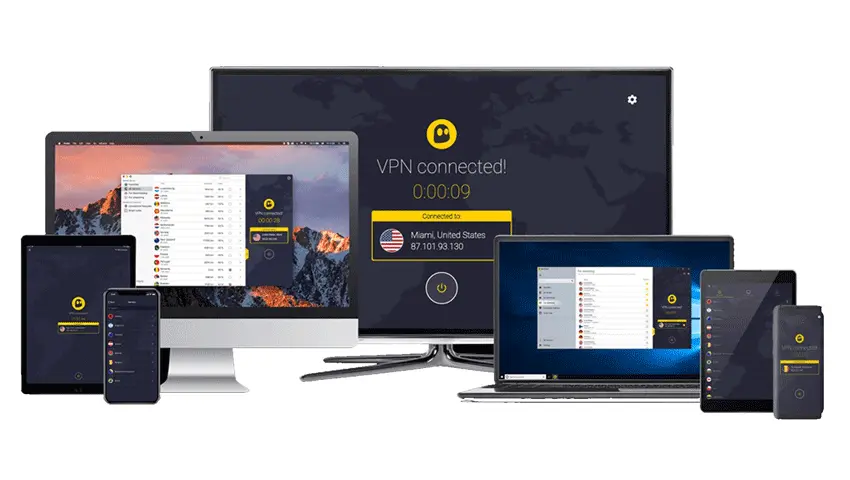
Yes, CyberGhost supports up to 7 devices at once, plus router set-ups for whole-home cover
UP TO 7 SIMULTANEOUS DEVICES
CyberGhost allows up to 7 devices connected at the same time on one subscription. In real use, this is enough for a typical household: a couple of phones, a laptop or two, a tablet, and a streaming device, all protected without constantly signing devices in and out.
ONE ACCOUNT, HOUSEHOLD-FRIENDLY
If you share Wi-Fi with family or housemates, one CyberGhost account can cover the main devices everyone uses. For bigger set-ups, using CyberGhost on a VPN-compatible router can protect everything connected to your home network, which is useful when you have more than seven devices in total.
PHONES AND TABLETS
On mobile, CyberGhost is an easy “tap to connect” option for public Wi-Fi. It is particularly handy for travel, cafés, and hotels, where you want encryption on by default without having to think about it each time.
LAPTOPS AND DESKTOPS
On computers, it is useful for day-to-day browsing, downloads, and remote work sessions. You can keep the VPN on in the background and switch locations quickly when you need a different region or a less congested server.
TVS AND STREAMING DEVICES
For streaming, CyberGhost can be used on supported platforms (such as Android TV and Fire TV) or through router and DNS-style set-ups for devices that do not run VPN apps. This keeps your living-room viewing protected without needing to reconnect on every device.